Helping founder-led marketing, branding, and creative agencies
regain 100's of hours and $100K's a year.

The 100 Hour Playbook
Get your FREE playbook for smart agent
systems to regain 20+ hours a week
Follow 99fold on socials







Congrats, you're now ready to use smart AI and agent systems.
That save you 100+ hours a month.
Here's exactly how.
For the last year I've been using a Client Onboarding Smart System that auto onboards new clients for me.
No manual inputs. No chasing up.
A client enters their details. The system takes over.
The client and I have everything send to us.
And I'm giving you this same system.
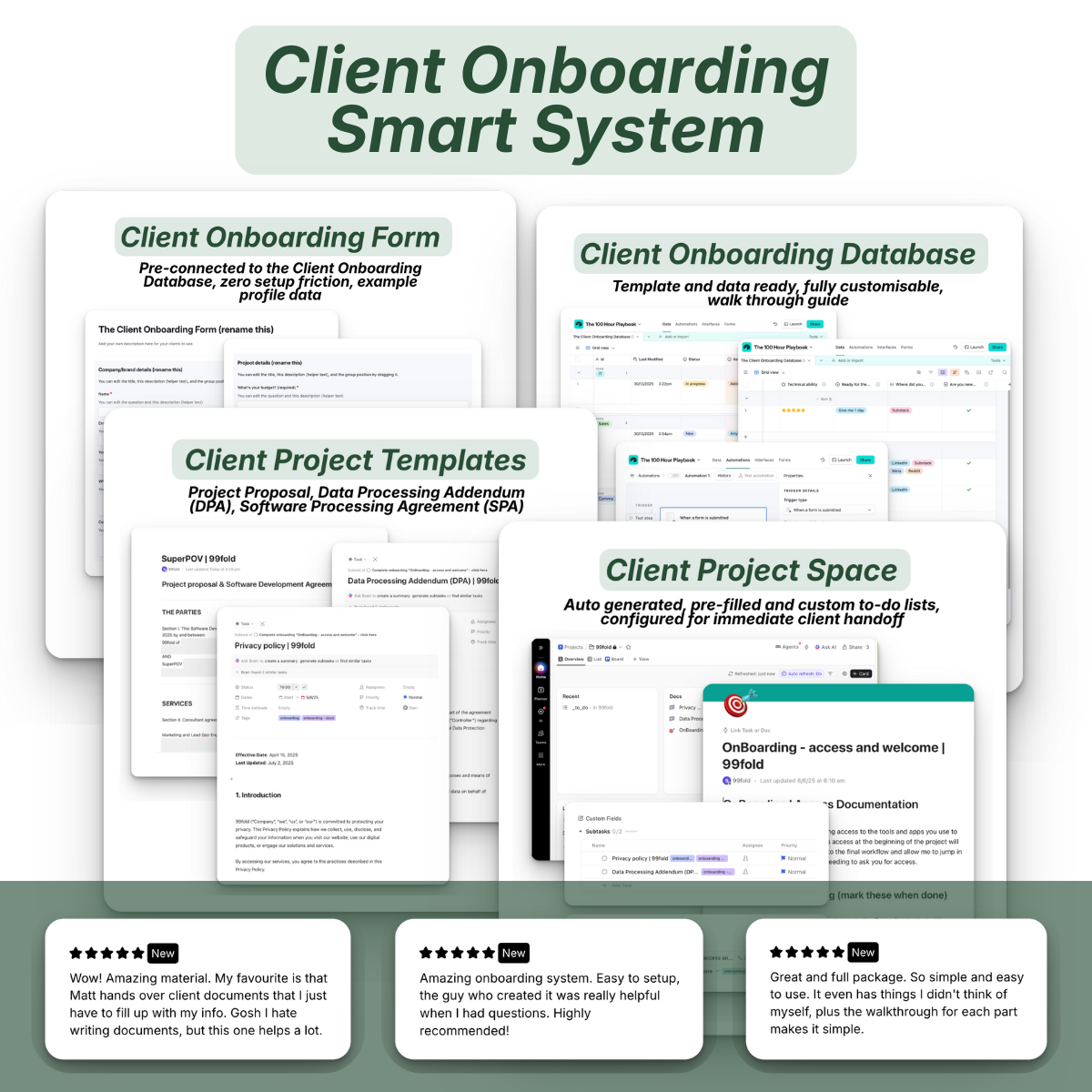
The Client Onboarding Smart System
When you need smart systems that save hours and deliver fewer headaches
Thank you
This is for founders, agencies, and freelancers who believe that your time is for your best work.
And not the work to get you there.
I'm focusing on you if you want more freedom in your day.
And less time on low value tasks that subtract from getting more projects and time for better clients.
If you want to work less, make choice a priority,
and learn better ways to make life simpler, keep reading.
Picture this. You just signed a new $12K client. Now comes the part you're dreading: the intake and handling nightmare.
Copying form responses into spreadsheets. Sending welcome emails manually. Sending the same onboarding docs you've sent 99 times before.
Most founders and B2B owners operate like this until something breaks.
Sound familiar?
You're thinking there's something missing because it shouldn't be this difficult every time.
And you're right.

Sitting on the curb gives you a different perspective. Cauca Viejo, Colombia, 2026.
But it's not you. It's the system you've been using.
It's doing what it needs to, but you're operating beyond it.
You don't need to try to keep up, that's just more headaches and lost time.
You need smart infrastructure.
Things that show up when you can't and execute when you won't.
What does a smart system look like?
Smart systems handle your entire client onboarding for you.
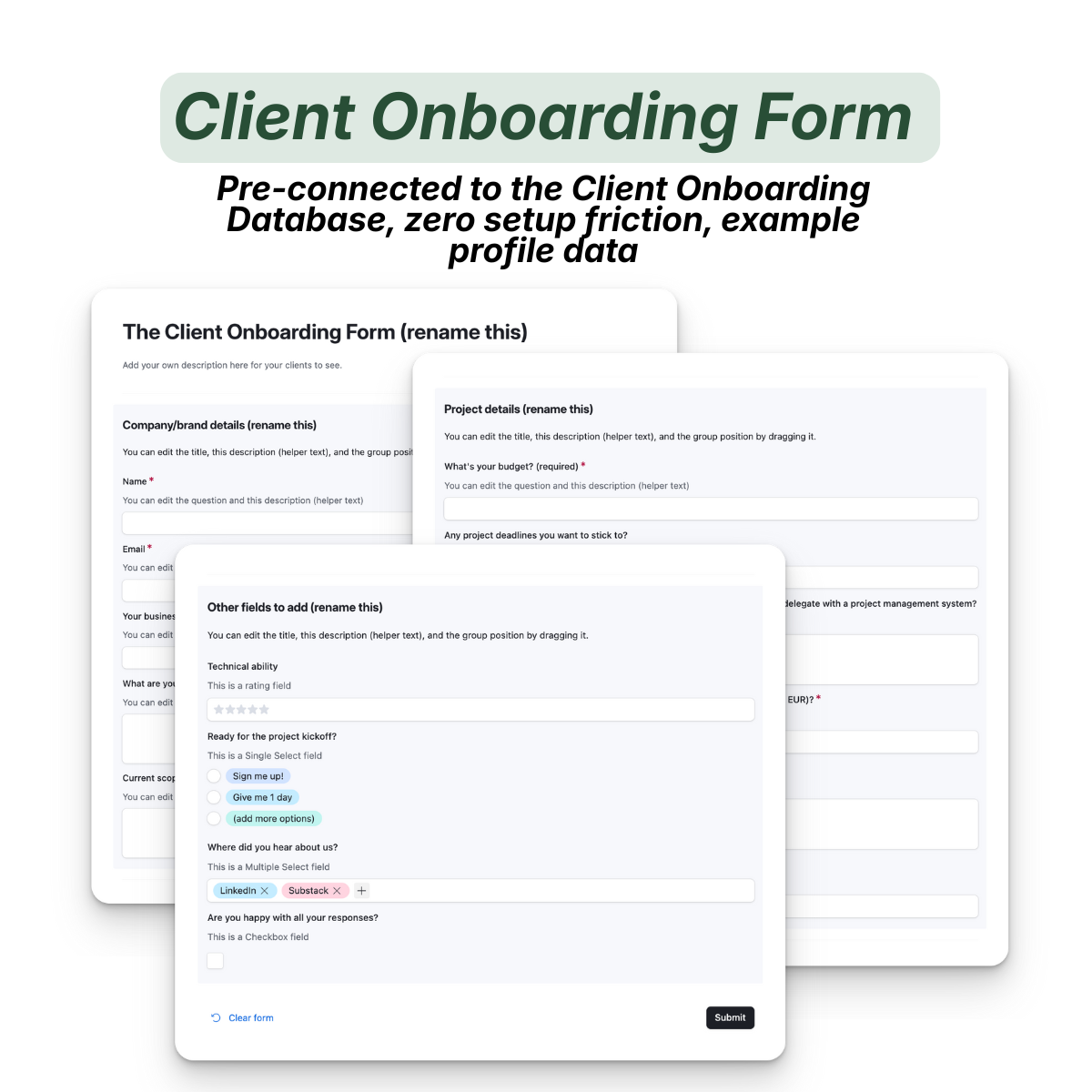
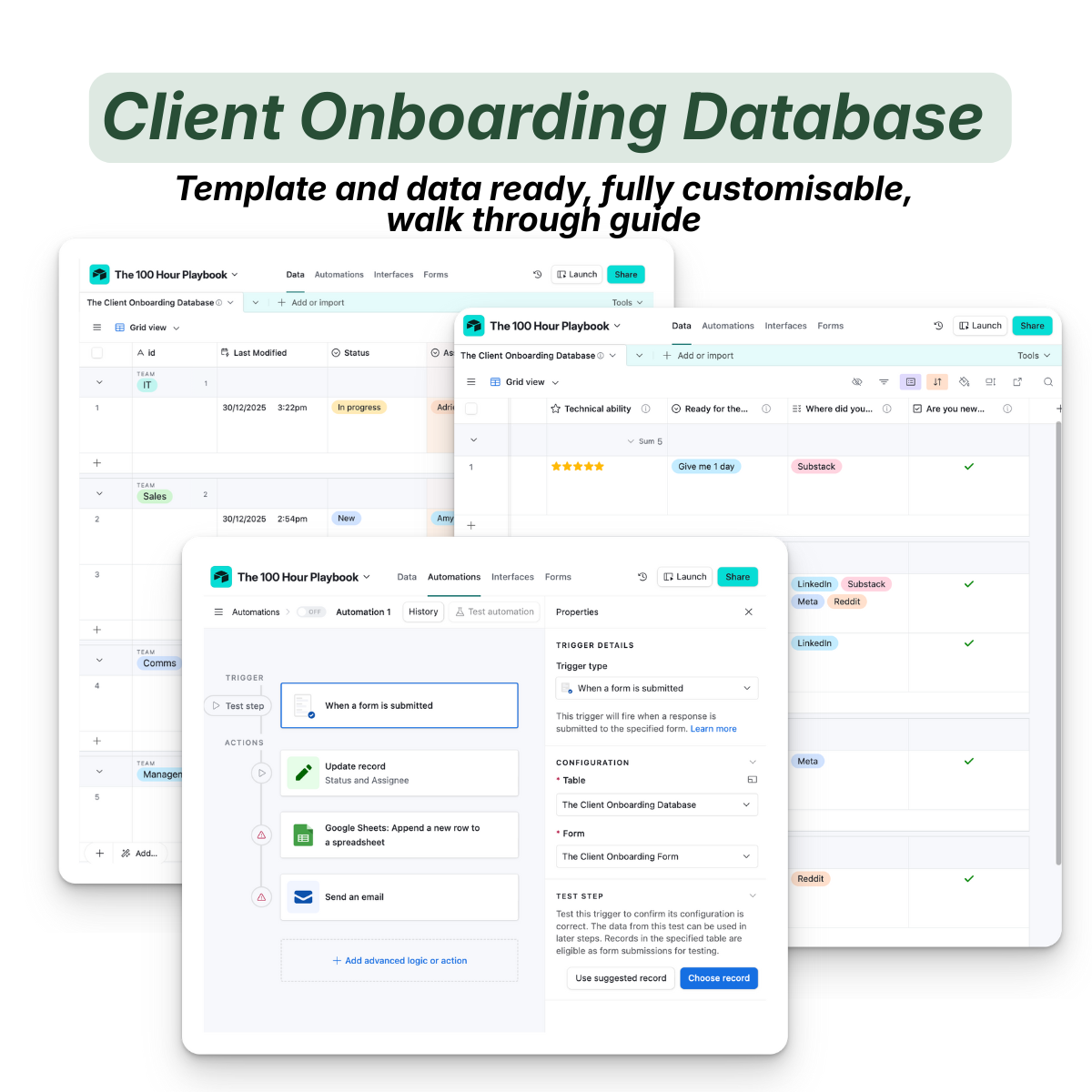
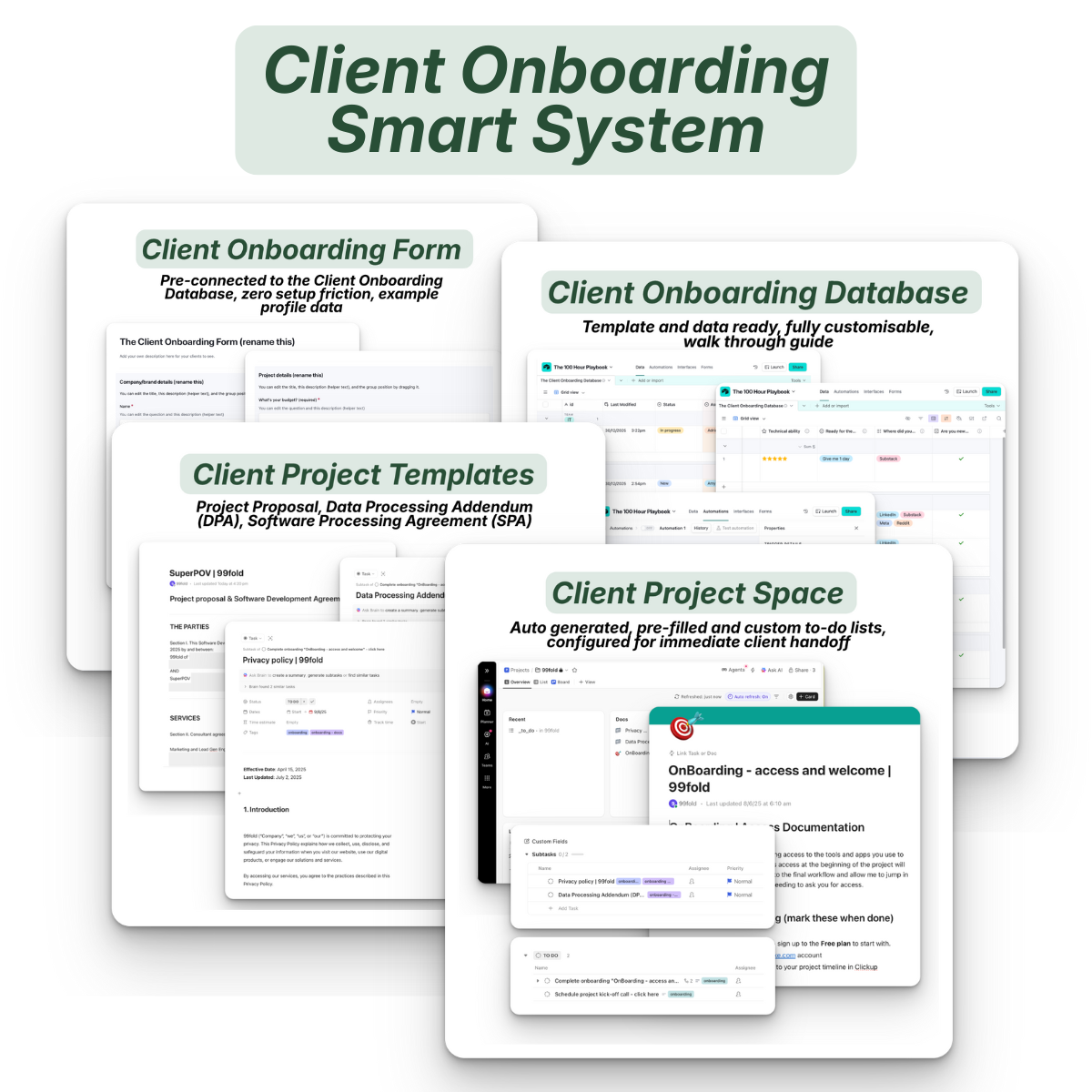
→ Client Onboarding Database template (ready to use, fully customisable)
→ Client Onboarding Form (pre-connected to your database, zero setup friction, example profile data)
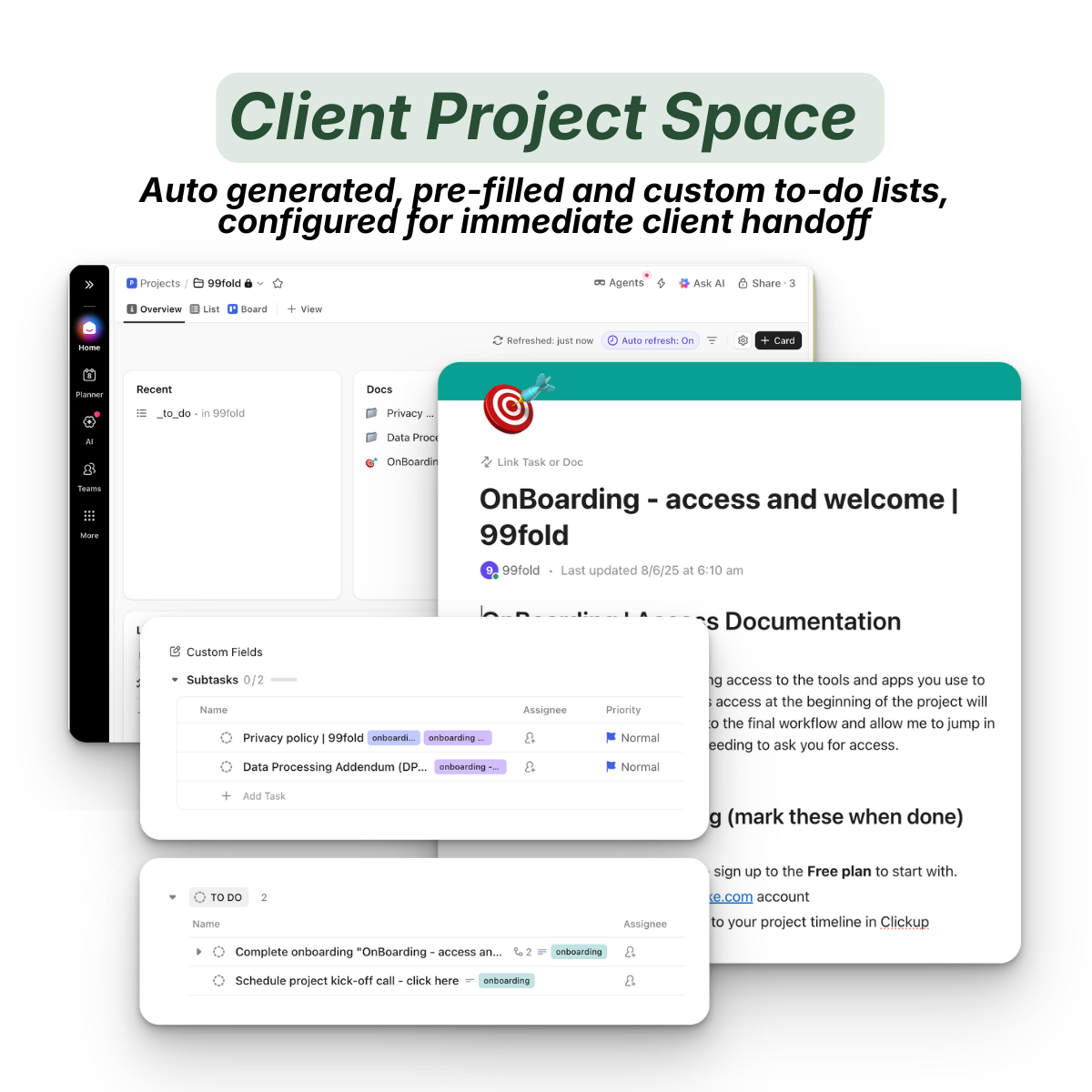
→ Client Project Space (Clickup; configured for immediate client handoff)
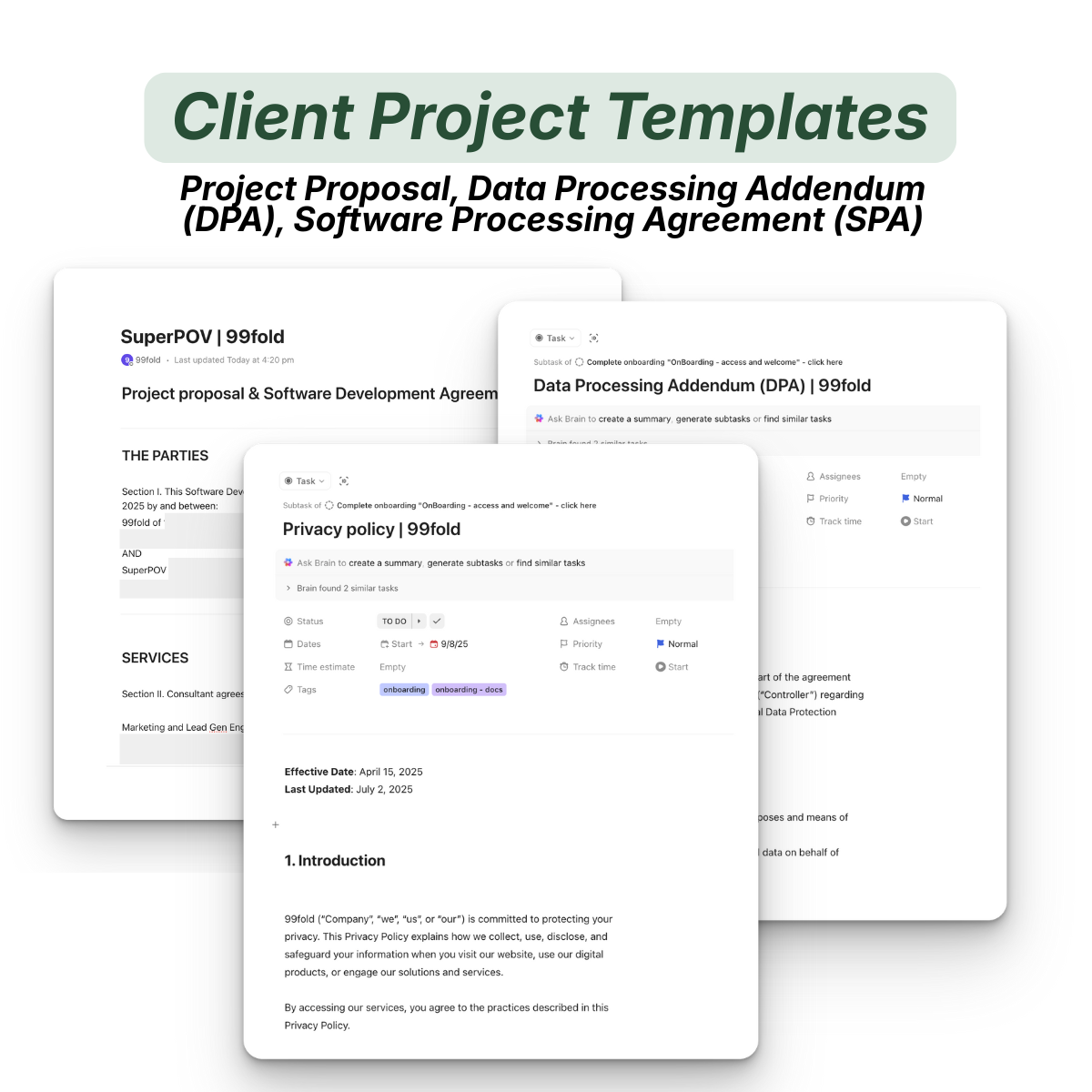
→ Complete Project Proposal Template (Services, Requirements, Confidential/Proprietary Information. Assignment & Delegation, Governing Law)
→ Client project documentation and appendix templates: Data Processing Addendum (DPA) & Software Development Agreement (SDA)
→ Setup documentation and FAQ coverage (so you're not guessing)
→ Walkthrough guide on all the above steps with pre-filled example sections
→ 1:1 video chat with me for all questions, troubleshooting, or custom tweaks you want to see.
What it does:
→ Automates client intake from form submission to project kickoff
→ Eliminates manual data entry and follow-up chaos
→ Keeps your pipeline visible and your clients moving forward
→ Runs in the background once deployed
This is infrastructure most agencies don't know exist.
You just need it pre-built, tested, and ready to work for you.
How does a smart onboarding system work?
If you're relying on your onboarding notes from two years ago that you occasionally update, you don't have a system, you have a memory test.
Nothing here scales, it only gets stuck and waits for you to fix it.
Most people patch things with Google Forms, Notion docs, and reminder apps.
The problem is these don't sync and they don't execute.
You're working to connect everything yourself.
Which means you're always chasing and always behind.
A smart onboarding system does this for you.
It works because the hard part of building the infrastructure is already done.
So you're not starting from scratch, you're deploying a working system.
Here's the rundown:
↳ A new client submits the Client Onboarding Form
↳ The client and project details are auto captured and stored in the Client Onboarding Database
↳ The new client project space contains all documents, templates, and guides: Project Proposal, Data Processing Addendum (DPA), Software Development Agreement (SDA), custom to-do list, (Clickup)
↳ Setup documentation, FAQ coverage, and walkthrough guide are done with pre-filled example sections
↳ The project space tracks all updates and changes to the project

Some of your best ideas come to you late at night, by the pool.
Congrats, you're no longer referring to onboarding notes you made two years ago or a memory test of what's supposed to happen.
You're now using a clear, clean, fast system that manages the entire client onboarding pipeline.
One that's pre-built, battle tested, and ready to run. You set it up once. It runs forever.
Who is this for?
This is for founders, agencies, and B2B owners who are relying on manual data entry and follow-ups, who manage multiple client projects at once, and who want to scale easily and cleanly without interruption.
This is yours if:
✅ You're managing clients manually and losing hours to admin work that doesn't grow revenue.
✅ You want a repeatable process that handles intake, kickoff, and handoff without constant attention.
✅ You've tried building systems before, but they either broke or required too much maintenance.
✅ You need something that works immediately and scales as you grow.
This is not for:
❌ People who prefer manual control over every client interaction and step
❌ Teams that need complex permission requirements or enterprise CRM features
❌ Anyone expecting a plug-and-play solution without any initial setup.
The Client Onboarding Smart System
Everything you need is below!
The Old Way vs The New Way
Old Way:
❌ Manual form responses and handling.
❌ Copy-paste client and project info into spreadsheets.
❌ Sending emails and project kick-offs individually.
❌ Creating project folders by hand.
❌ Chase clients and tasks for missing info.
New Way:
✅ Reliable sit-and-wait setup for client to fill out form.
✅ Templated and customisable client and project database that updates automatically.
✅ Instant and clean project spaces that you can customise to your brand generates instantly.
✅ Auto trigger system that initiates and schedules tasks and follow-ups.
FAQs
You're ready to delegate your entire client onboarding and project workload to a smart system.
But you're unsure about the setup, the workflow steps, or you simply have questions.
Email me anytime, I reply to every email personally.
And to make it simpler, here's a list of common questions I get about all my systems and automations:
You're all set!
🔑 I have the technical chops of a cardboard box. Can I actually put this together myself?
Of course, I wouldn't offer this if it wasn't possible for anyone. This is a pre-built system with templates and guides, not a coding tutorial. If you can follow a recipe, you can deploy this system fully.
🔑 How much time does it take to set up?
The setup is <60 mins. After that, everything runs automatically. You're not building from scratch, you're using and adapting a working template.
🔑 Do I need to pay for a bunch of different tools?
Nope because everything here runs on free tiers. I'm making it as simple as possible.
Of course, you can scale as much as you like. Paid tools scale with usage, not upfront, so you're renting infrastructure only when you need it.
🔑 What if something breaks? Can I contact someone?
Yep, me directly. Email me at [email protected]. I'll walk you through every step. And this isn't ticketed support, it's a direct walkthrough for any steps you're stuck on.
Try It Risk Free
We all know what it's like breaking into something new.
But that's why you need new: to redesign old ways into smart systems to stay ahead.
And see actual results in time and resources saved.
But if for some reason you can't make this work for you, email me within 72 hours hours and I'll refund the Client Onboarding Smart System for you.
But you keep The 100 Hour Playbook either way, that's yours forever.
Plus you now have my details so ping me anytime.
The Client Onboarding Smart System
$9.00
Final Notes
Once you start thinking in systems, you'll start to change the way you do, manage, and perceive your work.
I did it. And it completely changed the way I think, operate, and execute.
Start using it to make things work for you, show up for you, and manage for you, when you can't or won't.
Keep building,
Matt
Founder, builder, tech enthusiast